
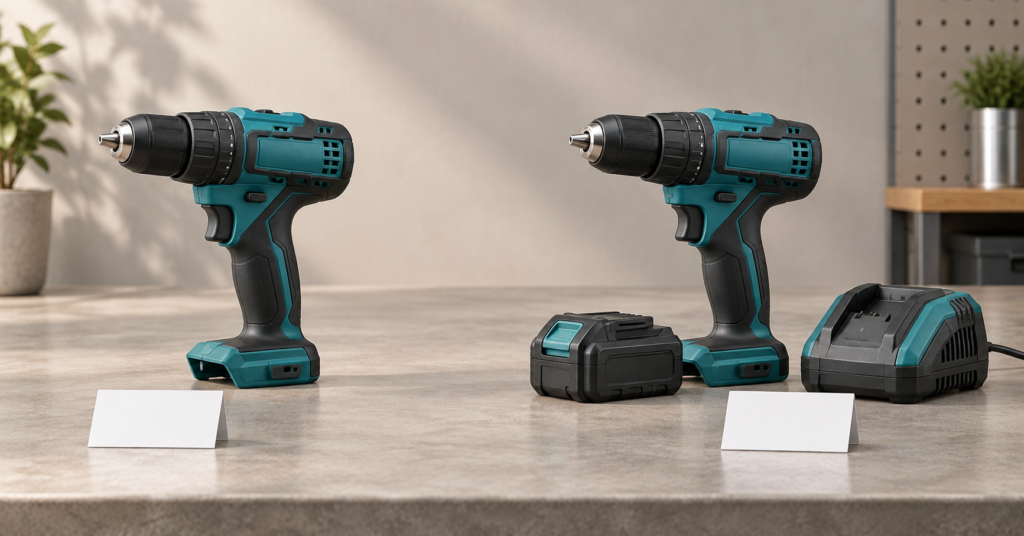
Collecting a price from a product page is only the first step. The harder part is proving that the price belongs in the comparison.
Price scraping is the automated collection of prices from online stores. For ecommerce teams, a useful observation also needs a specific product, variant, seller, currency, availability state and point in time.
A cordless drill can appear under the same model name in two stores, while one listing includes a battery and charger and the other sells only the tool. A price scraper can extract both amounts perfectly and still produce a misleading comparison.
The workflow below shows how to validate a drill-kit comparison, then turn those checks into a repeatable collection process.
Key takeaways
- Save the exact variant, seller, currency, stock status and observation time alongside every price.
- Separate the current public price from member offers, crossed-out prices and installments.
- Preserve failed checks and excluded offers with clear reasons. Missing prices must not become zero.
- Build comparisons from eligible observations, with a defined market, freshness window and price basis.
In this guide: Exact variants · Worked example · Data fields · Error checks · Tool choices
Which price should you collect?
Start by defining the purchase you want to compare. A useful default is one new item or complete kit, offered to the public in a specified market, without membership or coupon requirements.
A page can contain several legitimate amounts. The current selling price may be a sale price. A crossed-out amount describes a reference price; a member price applies to a narrower audience. Monthly installments and “from” prices need their own labels.
Collect those amounts separately when they matter. Never let the first currency symbol on the page decide which one becomes the competitor price.
Also define whether the comparison covers the listed item price or a delivered total. A delivered total requires a destination and consistent treatment of shipping, taxes and mandatory fees. Unknown shipping must remain unknown, rather than silently becoming free shipping.
Write the comparison rule before building the scraper. It gives every later validation step a clear purpose.
Match the exact product variant and pack contents
Match identifiers first, then check the attributes that define the saleable item. Use a Global Trade Item Number (GTIN) or a brand plus manufacturer part number (MPN) where available. These are stronger clues than a similar title, but conflicting page details still need review. A retailer SKU generally identifies a record within that retailer; it is not a universal cross-store key.
Product structured data can help. A ProductGroup groups related products, hasVariant identifies its variants, and variesBy describes their differences. The group’s identity alone does not establish the selected variant’s price.
For a power tool, check the model, battery voltage, included batteries and charger against the intended part number. For shoes, check size and color. For packaged goods, check the amount in each pack and the number of packs included.
Pack contents belong in product identity. A bare drill and a drill-plus-battery kit should not enter the same exact-product benchmark just because the tool itself matches. Even two kits can differ in battery capacity or battery count.
Unit prices can support a separate analysis, such as cost per liter or per consumable. Dividing a bundle’s price by its item count does not establish that its contents are interchangeable with another product.
Keep uncertain matches out of the benchmark until reviewed. The product matching workflow explains how this step connects a competitor listing to the product you actually sell.
Validate a drill-kit comparison from capture to benchmark
Consider this hypothetical target: Example Tools, kit MPN EX18-D2-KIT, model EX18-D2 cordless drill, one 18 V 2.0 Ah battery, charger included, new condition. The brand, model, part numbers, sellers and prices below are invented to demonstrate the checks.
Our example benchmark covers public USD item prices for that exact kit in the US, excluding shipping and tax. It requires confirmed in-stock status and observations from the preceding 24 hours. That freshness window is an example policy, not a universal recommendation.
Before calculating a benchmark, require a successful capture, a positive amount, a confirmed currency and an exact match. Check condition, stock, purchase terms and freshness. Unknown stock status does not qualify as in stock.
All five observations below were captured within the window before the September 25, 2026, 15:00 UTC cutoff. The products are new, and their market, currency and tax basis agree. The remaining checks decide eligibility.
| Offer | Captured product and terms | Price | Benchmark decision |
|---|---|---|---|
| A | Exact kit MPN and contents; public price; in stock | $119.99 | Include |
| B | Same drill, tool only; MPN EX18-D2-BODY; public price; in stock | $74.99 | Exclude: battery and charger missing |
| C | Exact kit MPN and contents; public price; out of stock | $109.99 | Exclude: unavailable |
| D | Exact kit MPN and contents; member-only price; in stock | $99.99 | Exclude: membership required |
| E | Exact kit MPN and contents; public price; in stock | $124.99 | Include |
Offer B is the critical test. A title-based search for “EX18-D2 cordless drill” can find it, and the amount can parse correctly. The tool model matches, but the saleable package does not. Checking the kit MPN and included components rejects it before any price calculation.
A shortened observation record for offer A could look like this. The URL is illustrative.
{
  "offer_id": "seller-a-kit-01",
  "seller_id": "seller-a",
  "url": "https://example.com/drill-kit",
  "mpn": "EX18-D2-KIT",
  "variant": {
    "tool_model": "EX18-D2",
    "battery_voltage_v": 18,
    "battery_count": 1,
    "battery_capacity_ah": "2.0",
    "charger_included": true
  },
  "raw_price": "$119.99",
  "amount": "119.99",
  "currency": "USD",
  "price_type": "public_current",
  "market": "US",
  "condition": "new",
  "price_basis": "item_excluding_shipping_and_tax",
  "availability": "in_stock",
  "observed_at": "2026-09-25T14:10:00Z",
  "collection_status": "success",
  "match_status": "exact"
}
The amount is a string for decimal-safe serialization. Currency and availability must come from captured evidence; setting a field does not prove it.
The eligible set contains A and E. Its minimum is $119.99, and its median is $122.49, calculated as (119.99 + 124.99) / 2. The report should show that it uses two eligible offers from five candidates. This small set describes those offers, not the entire power-tool market.
Keep B, C and D with their exclusion reasons. If none qualified, the result would be “no comparable offers,” not a zero benchmark.
A practical data schema for ecommerce price scraping
Use one observation for one seller’s offer of one exact variant at one time. Keep stable offer identity separate from the values that change at each check.
The following schema is a starting point for a database or structured export. It also works as a checklist when evaluating a price scraper tool.
| Field group | What to save | What it lets you verify |
|---|---|---|
| Offer identity | Offer ID, seller ID, product URL, selected variant URL or ID | Which listing and seller produced the observation |
| Product identity | Brand, manufacturer part number (MPN), Global Trade Item Number (GTIN) when available, retailer SKU | Whether the listing describes the intended product |
| Variant and contents | Size, color, capacity, technical configuration, pack count, bundle contents | Whether both buyers receive the same item |
| Price | Raw price text, normalized amount, currency code, price type, purchase conditions | What the displayed amount actually means |
| Purchase context | Market, item condition, tax basis, shipping amount or unknown status | Whether the amounts use compatible assumptions |
| Availability | Raw stock wording and normalized availability | Whether the offer belongs in an in-stock comparison |
| Time | Observation timestamp with timezone, attempt ID | When the evidence was captured and which check produced it |
| Collection evidence | Collection status, extraction method, saved price and variant evidence | Whether the data came from a usable product response |
| Comparison decision | Matched variant ID, match status, benchmark eligibility, exclusion reason, rule version | Why a saved observation was included or withheld |
These fields describe different decisions. A fetch can succeed while the match fails. A match can be correct while the offer is out of stock. A valid observation can become too old for today’s benchmark.
Preserve the original observation. Store matching and benchmark decisions alongside it, with the rule and cutoff used. That lets you explain an earlier report without reading today’s page and treating it as historical evidence.
Extract prices from HTML, embedded data or dynamic pages
Find where the selected variant’s price comes from before choosing an extraction method.
- Initial HTML: the response already contains the price and relevant product details. Extract them from the product’s price area, excluding recommendations and unrelated offers.
- Embedded data: JSON-LD or page JavaScript contains products, variants and offers. Select the record for the intended variant and seller.
- Dynamic content: another request supplies the price after loading or variant selection. Inspect that data source where access permits, or use browser rendering when the required state depends on page interaction.
Structured data is useful evidence, but it can disagree with the visible selection. If one says “tool only” while the selected control says “kit,” flag the conflict. Choosing the cheaper amount would conceal the problem.
Save the evidence needed to trace the amount back to the captured variant. An HTTP success response alone is insufficient: a login screen, security challenge or incomplete page can contain no usable product evidence.
Normalize price and currency without changing their meaning
Normalization turns price text into a usable amount while preserving its context. Keep the original string so a reviewer can inspect ambiguous results.
For example, 1,249.99 and 1.249,99 can represent the same amount under different number formats. Use the page’s locale and price formatting to resolve separators. Don’t remove every comma and hope the result is correct.
Store monetary values using decimal-safe arithmetic (for example, Python’s Decimal) or integer minor units rather than binary floating-point.
A currency symbol is only a clue. $ alone does not establish USD. Confirm the currency through an explicit code, the selected storefront currency or other consistent page evidence. If it remains unclear, retain the amount and mark the currency unresolved.
Keep original and converted amounts separate if conversion is required. Save the exchange rate, its timestamp and the target currency. A change caused solely by the conversion rate should not appear as a retailer’s price change.
Missing amounts should remain null. Likewise, a “Free shipping” badge must never become a zero product price.
Errors that produce the wrong pricing conclusion
Validation should explain both the defect and its effect on the comparison. This makes failures easier to diagnose than a single “invalid data” flag.
| Collection or matching error | Wrong conclusion | Verification before comparison |
|---|---|---|
| A bare drill is matched to a kit with a battery and charger | A competitor sells the same product for much less | Compare kit MPN, battery count and capacity, and included charger |
| A crossed-out price is stored as current | The competitor increased its price | Check the amount’s label and active offer |
| A member price enters the public-price set | Every customer can buy at the lower price | Save membership and coupon requirements separately |
$ is assumed to mean USD | A foreign-currency offer undercuts the market | Confirm the currency code and storefront context |
| An out-of-stock listing sets the minimum | Buyers can purchase at that price today | Require observed in-stock status for this benchmark |
| A failed extraction becomes zero | The product is free or heavily discounted | Store null plus the collection failure status |
| An older price receives today’s timestamp | The competitor still offers the old price | Preserve the original observation time |
| Tracking URLs duplicate one seller’s offer | Several competitors confirm the same market price | Deduplicate seller, listing and variant identity |
An unusual price also deserves a review path. Keep the captured amount, mark the anomaly, and verify the product state before using it in an alert. Automatically replacing an outlier with an expected value would erase the evidence you need to investigate it.
Keep observation history and control request intensity
Save a new observation for each completed check, even when the amount stays unchanged. An unchanged price confirms what was observed at that time. A failed check confirms only that fresh evidence was unavailable.
Track the last attempt separately from the last successful observation. If today’s request fails, yesterday’s price can remain visible as historical context with its original timestamp. It must not gain a new freshness date.
Store timestamps with an explicit timezone, commonly UTC, and define the market timezone for daily reports. A check records when you observed a price, not the precise moment the retailer changed it. Changes between checks can be missed.
For a current benchmark, use the latest observation at or before a fixed cutoff for each offer, subject to the freshness rule. Don’t reach back to an older in-stock price when a newer observation says the offer is unavailable.
Monitoring cadence and request intensity are separate controls. Cadence determines when a product needs another check. Per-site concurrency and request delays determine how those checks reach a retailer. Stagger work, slow down on errors, and bound retries so failures don’t create a request surge.
Choose cadence around decisions your team can act on. The guide to when to update prices based on competitors develops that decision further.
Price scraping tools: build, configure or use a service?
Choose an approach according to the work your team can own after the first successful extraction. Collecting a sample is only one part of maintaining comparable data.
| Approach | When it fits | What to evaluate |
|---|---|---|
| Build your own collector | You need custom fields, unusual sites or close integration with an existing data system | Engineering capacity for extraction, changes to pages, scheduling, matching and quality checks |
| Configure a general scraping tool | You want to collect structured data from a defined set of pages with less custom collection code | Variant selection, dynamic-page handling, raw evidence, failure reporting and export control |
| Use a specialist price monitoring service | Your team needs recurring competitor comparisons, history and pricing analysis | Exact-product matching, review controls, supported markets, availability treatment and access to historical evidence |
The right choice depends less on how quickly the first prices can be extracted and more on who will maintain matching, validation and history afterwards.
A general tool can suit a focused research project. A custom collector can fit a team with established data infrastructure. A specialist service can reduce operational work when its coverage and comparison rules fit the catalog.
Evaluate each option against the drill-kit example above. Ask it to identify the correct kit, separate the member price, retain the unavailable offer and explain the two eligible results. That reveals more about suitability than a demonstration that returns five amounts.
Access rules and collection limits
Read the site’s robots.txt file and check for available feeds or APIs before scheduling collection. Robots.txt communicates rules for crawlers about which paths they may fetch. Those rules do not grant access authorization or settle whether a particular scraping project is legally permitted.
Review applicable terms and permissions separately. Keep requests bounded, respect access restrictions, and record denied or challenged responses as collection failures. An inaccessible page does not establish that a product is unavailable.
From collected prices to a comparison you can use
Once those checks are in place, scraped prices become usable inputs for competitor analysis rather than just a list of numbers.
SkuPeek uses that workflow to connect matching competitor offers with price and stock history and benchmarking.
A matching offer may later go out of stock, change purchase terms, or become too old for a current report. Keep each report tied to the observations that qualified at its cutoff, so a reader can see which offers supported the comparison.
Start with a small set of your own products. Review the captured fields and every inclusion decision before expanding collection. Once you can trace a benchmark back to the exact offers and observations behind it, you have a basis for deciding whether your prices need attention.
See how your own catalog compares with the market
SkuPeek finds matching competitor offers and compares their prices and availability with your products.