
Your price has stayed the same since Monday, but competing offers have changed. A competitor has ended a promotion, two other stores have reduced their prices, and the cheapest listing is now out of stock. The spreadsheet that supported your last decision no longer describes what customers can buy.
Competitor price monitoring helps you spot changes worth reviewing. Fresh prices and stock information give you a basis for deciding whether to lower your price, hold it, or test a higher one.
Why outdated competitor prices can lead to poor decisions
Competitor price monitoring means checking relevant offers regularly and comparing them with your own. A manually maintained spreadsheet can mix an old price from one store with a current promotion at another. As the list grows, collecting the numbers can take time away from reviewing them.
Stale comparisons can hide a widening price gap, keep an unnecessary discount running, or send you chasing an expired offer. Record when each price was checked and refresh older entries before acting on them.
Keep your own costs alongside the comparison. A price that attracts orders can still leave too little to cover the cost of selling them.
Monitoring prices is not the same as changing prices
A competitor’s price cut is a reason to review your position, not a command to follow. Separate the work into three activities so that collecting fresh data does not become a habit of changing prices without a clear reason:
- Collection: obtain current prices, availability signals and observation times.
- Review: check whether the change matters for your customers and costs.
- Execution: approve and apply a change in your store, then evaluate the result.
These can run on different schedules. You might collect daily, review exceptions each morning, and leave most prices untouched. Change a price when the review identifies a useful action, then test whether it delivers the result you expected.
How often should you check competitor prices?
Start with the products where a missed change would matter most. A bestseller facing frequent promotions deserves more attention than a slow-selling item in a stable category. Compare stores serving the same region and customer needs; an irrelevant seller can add work without improving the decision.
Adjust the schedule for seasonal demand, upcoming campaigns and your team’s capacity to respond. Assign someone to review each priority group, so an important change does not sit unnoticed in a report.
Suggested starting schedule to test, not a universal standard:
- Priority products with active competition: start with a daily check and a named reviewer.
- Stable, lower-priority products: test a weekly check, with an extra review around known promotional events.
- Short campaigns or unusually active periods: consider additional checks around campaign starts and ends, if your tools and team support them.
Review the schedule after a trial period. Did you miss meaningful changes, or did extra checks produce repetitive noise? Adjust by product group using the options your tools support. Hourly checks are not a default requirement.
Four checks before you react to a competitor’s price
Are you comparing the same product and variant?
Check the model, size, colour, capacity, pack contents and condition. A manufacturer part number or GTIN helps identify the product, but verify the selected variant too. Retailers’ internal SKUs can differ for the same item.
A lower price for a single module is not a discount on a two-module kit. Likewise, refurbished stock should not silently become a benchmark for a new product. SkuPeek’s competitor product matching supports reviewing matches before they enter your comparison. Resolve ambiguous matches before making a pricing decision.
Is this one offer or a broader price gap?
Compare several relevant offers. The minimum shows the cheapest listing in that set, the range shows the spread, and the median gives a central reference. One unusually cheap seller does not describe the whole market.
Use competitor price benchmarking to assess the gap across matched offers. Several sellers moving together deserve closer review than an isolated discount. Check which offers are included: a different comparison set can change the median.
Can the customer actually buy the cheaper offer?
Check whether the correct variant is available in the customer’s region, what delivery adds, and whether the displayed price requires membership, a coupon or a subscription. A cheap unavailable listing and an offer ready to order are different competitive signals.
SkuPeek’s competitor stock monitoring adds public availability signals to price comparisons. These are not a competitor’s internal inventory quantities. An unknown status means availability needs verification; it does not prove the item is out of stock. Public availability also does not guarantee that checkout will succeed.
Does the change work for your costs and profit goals?
Work out what a lower price would leave after product costs, payment fees, fulfilment and returns. Set an acceptable contribution before testing a discount. Another store may have lower costs or a clearance target that makes its price unsuitable for you.
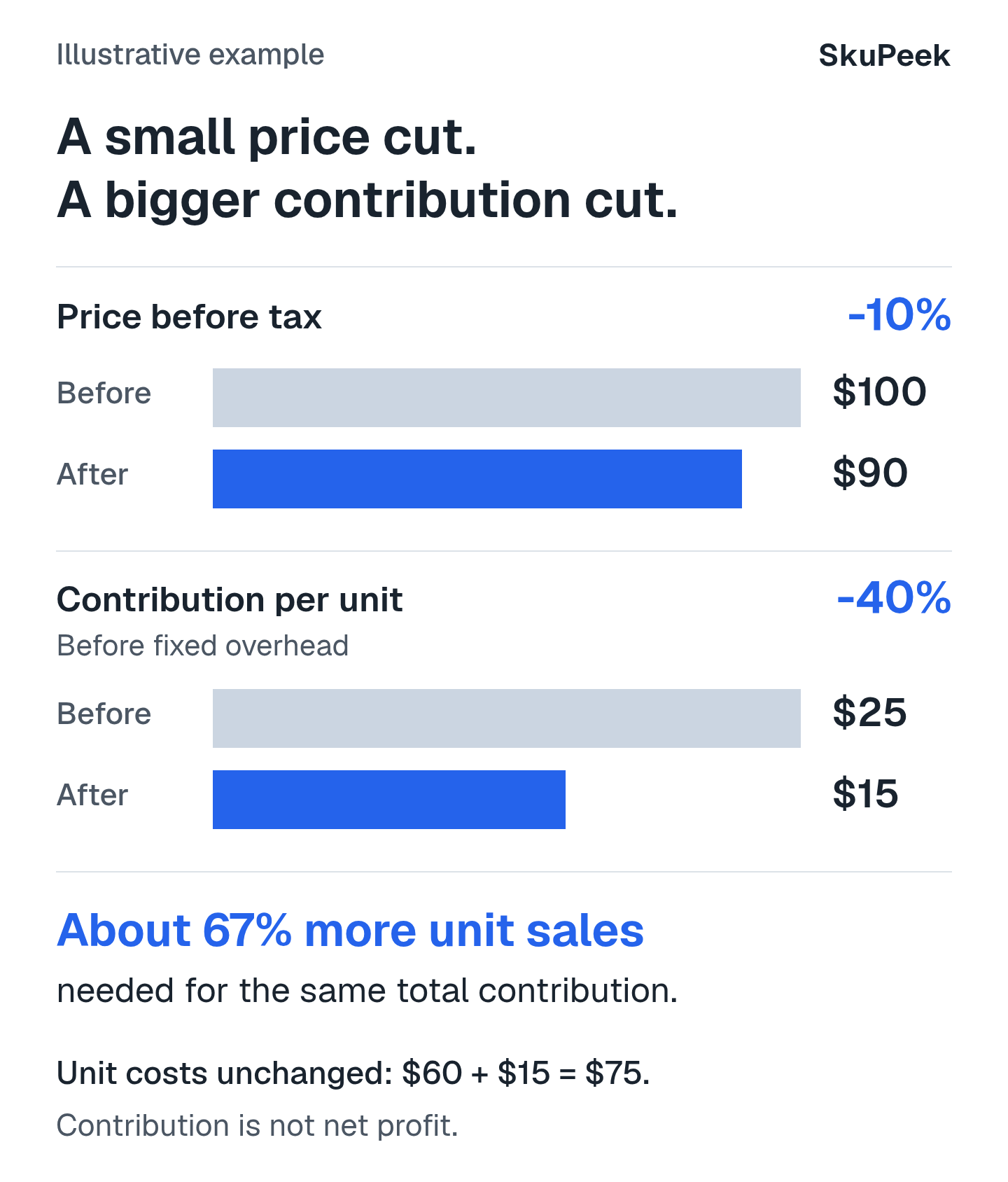
Illustrative example: suppose an item sells for $100 before tax, its product cost is $60, and other variable selling costs total $15. Contribution before fixed overhead is $25. Reducing the price to $90, with those costs unchanged, leaves $15. That is a 10% price cut but a 40% reduction in contribution per unit.
Contribution before fixed overhead is not net profit. With those unit costs unchanged, you would need about 67% more unit sales to generate the same total contribution.
What our RAM pricing study shows
SkuPeek’s RAM pricing and availability study covered 22 desktop RAM configurations and 270 offers in the United States from June 1 to August 31, 2026. Each offer was a listing for one exact configuration, not a separate retailer.
In August, both DDR4 and DDR5 averaged 5.0 recorded price changes per offer per 30 days. That rate describes the sample; it does not tell a store how often to check prices.
The lowest in-stock price exceeded the lowest listed price in 147 of 2,024 configuration-day comparisons (7.3%). Each comparison covered one exact configuration on one day. Tracking price and availability together helps distinguish a cheap listing from an offer a customer can buy.
The sample did not represent the whole RAM market. Checks could miss intervening changes; prices excluded delivery, and stock status did not guarantee checkout. The study did not measure sales or profit gains.
When to lower, hold, or test a higher price
Choose the next step according to the size of the gap, the available offers and your cost limits.
| Observed situation | What to verify | Possible next step |
|---|---|---|
| Several matched, in-stock offers became cheaper. | Exact variants, delivery cost, promotion length and your cost limits. | Review the gap; consider testing a cut within your limits. |
| The low price belongs to an unavailable item. | Stock evidence and the next cheapest eligible in-stock offer. | Hold pending verification; review available offers. |
| Your price is well below relevant offers. | Match quality, demand, service and existing promotions. | Consider testing a higher price and measuring the outcome. |
| One competitor changed; the rest stayed stable. | Seller relevance, sale terms and whether the change lasts. | Investigate; consider holding while collecting more evidence. |
Build a repeatable competitor monitoring workflow
- Select products. Identify commercially important items and assign a reviewer.
- Find offers. Choose competitors serving comparable customers and regions.
- Verify matches. Confirm the product, variant, condition and pack contents.
- Refresh the data. Collect prices and availability on the chosen schedule, retaining observation times.
- Evaluate changes. Distinguish an isolated offer from a broader shift and check your costs.
- Decide. Record whether to hold, investigate or test a change, including the reason.
- Check the result. Use your store’s sales, conversion, return and contribution data to evaluate the decision.
SkuPeek’s competitor price monitoring software helps find matching offers and track their prices and public stock status. Your team sets cost limits and handles price changes in your store. Use your own sales and cost data to evaluate the results.
Before a test, define success and a review date. Account for advertising, seasonality and stock shortages: a sales increase after repricing does not by itself prove the new price caused it.
Keep comparisons current so your next pricing decision starts with what customers can buy now.
See how your own catalog compares with the market
SkuPeek finds matching competitor offers and compares their prices and availability with your products.