
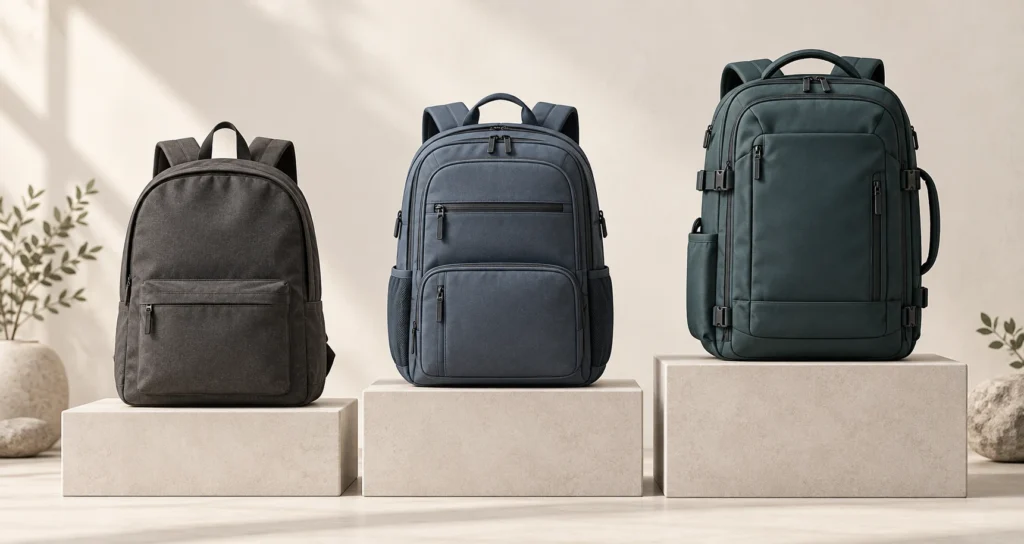
Price lining means organizing related products into distinct price levels, with differences in features, materials or service that explain each level. A good-better-best range offers an entry model, an upgraded model and a premium model at the same time. Each needs a clear purpose and a reason for its price.
For an ecommerce store, the practical task is to make the upgrade understandable. A customer comparing two adjacent models should be able to see what the extra money buys and decide whether that benefit matters to them.
Key takeaways
- Build each tier around a specific buying need, with a complete and usable entry product.
- Explain the added benefit before choosing the gap between prices.
- Review sales across the whole line: a new model can win customers or shift purchases from existing models.
What counts as price lining?
A price-lined range contains different offers at deliberately chosen price levels. Those levels can be individual prices or narrow bands containing several related items. For example, a retailer could group everyday, commuter and travel backpacks into three levels, with several colors inside each.
Good-better-best is one way to arrange that range. Two levels can be enough when there are only two distinct needs; another tier needs a useful role.
The distinction from choosing a price point is the buying decision. Testing whether one unchanged backpack should cost $50 or $60 concerns that product’s price. Offering a basic backpack at $50 and a different commuter model at $85 concerns the structure of the line.
A good-better-best example: three backpack models
Consider a fictional store designing a range of 20-liter backpacks. All prices are illustrative US dollar amounts, with the same tax and delivery treatment. The features describe proposed products, not an existing brand or a measured sales result.
| Model and price | Intended use | What the buyer gets |
|---|---|---|
| Everyday — $50 | Light daily essentials | One main compartment, a front pocket and adjustable padded straps |
| Commuter — $85 | Daily travel with a laptop | Everyday features plus a suspended laptop sleeve, an organizer panel and a more structured back panel |
| Travel — $135 | Frequent trips with work equipment | Commuter features plus a clamshell opening, a luggage pass-through and replaceable buckles |
The capacity stays the same. The upgrades concern organization, access and repairable parts, so the comparison does not depend on a larger bag being more expensive.
Someone carrying a sweater and lunch has a clear reason to choose Everyday. A laptop commuter can assess whether the sleeve and organization justify another $35. A frequent traveler can judge the next $50 against easier packing and compatibility with wheeled luggage.
The table gives the store a set of offers to test with buyers at the proposed prices.
How to build a product line with clear tiers
Design the offers together. An attractive product considered alone can still be hard to position beside the rest of the range.
1. Define the shared job and the reasons to upgrade
Start with the job every model must do. In the backpack example, that is carrying daily belongings comfortably. Then identify the situations that call for something extra: protecting a laptop, separating small items or opening the bag flat while packing.
Write a short sentence for each proposed upgrade: “Choose this model when you need ___.” If the sentence repeats the entry model’s purpose, clarify the difference before adding another price level.
Use customer questions, return reasons and product feedback to find these distinctions. Ask buyers what they carry and where their current bag falls short. A preference for the word “premium” tells you much less than a repeated problem with access to a laptop compartment.
2. Give every tier a complete offer
The entry model should fulfill its stated purpose. Make its limits clear: for example, a bag without a padded laptop sleeve can be suitable for general belongings. Describe that use accurately instead of presenting it as a laptop bag with essential protection withheld.
For the next tier, name the benefit behind each specification. “Suspended laptop sleeve” is a feature; keeping the laptop separate from loose contents explains part of its use. Only make impact-protection or durability claims if you have evidence for them.
The premium tier needs an equally concrete reason to exist. In this example, the clamshell opening changes how the bag packs, and replaceable buckles address a particular repair. Neither requires a vague promise of “ultimate quality.”
3. Set price gaps against the added benefit
Compare neighboring models side by side, showing the extra price and the features it buys.
| Upgrade in the fictional range | Extra price | Increase from the lower tier |
|---|---|---|
| Everyday to Commuter | $35 | 70.0% |
| Commuter to Travel | $50 | 58.8% |
The first step is smaller in dollars but larger as a percentage. That is useful context when reviewing the range: an extra $35 is a substantial increase from a $50 starting price. The percentages use the lower tier as the base; the second is rounded to one decimal place.
Equal dollar gaps and equal percentage gaps are both possible design choices. Set them around the added benefit, its cost and what the intended buyer is prepared to pay.
Ask people to compare the complete offers at their proposed prices. Include the option to keep their current product or buy elsewhere. If that research needs more structure, use the methods for measuring willingness to pay rather than treating a preferred tier as a confirmed purchase.
4. Check delivery costs and range complexity
Each tier must make operational sense at its expected sales volume. A feature can add work beyond its purchase cost: extra inspection, different packaging, replacement parts or support questions.
For the fictional Travel bag, replaceable buckles create a practical obligation. The retailer needs compatible spares, a way for customers to identify them and clear replacement instructions. Those requirements belong in the product decision before the feature appears in the comparison table.
Keep the launch range manageable. Three models in four colors create twelve model-color combinations to buy and replenish. A fourth model adds four more if it uses the same color range. Add that complexity only when the new offer serves a need the existing ones leave open.
5. Present the same comparison on every product page
Use consistent comparison rows across the range. For these bags, useful rows include capacity, laptop storage, opening style and repairable parts. Show the same attribute in the same terms for every model, including when it is absent.
Use-case labels such as Everyday, Commuter and Travel can explain more than “Silver,” “Gold” and “Platinum.” Keep the concrete differences visible beside the labels so a buyer does not have to interpret a status hierarchy.
Let customers buy each model on its own merits. The premium option’s price can also become a reference in the comparison; that separate effect is covered in price anchoring. The product-line decision still needs to stand on the benefits of each offer.
When to add, remove or reposition a tier
Add a model when you can identify a need that the current range does not serve well. A price gap by itself is a weak reason to create another product.
Suppose buyers like the $85 Commuter bag but repeatedly request travel access without all the $135 model’s features. That is a reason to investigate an intermediate offer. Adding it within the existing range is product line filling. Extending the range with a lower entry price or a higher premium price is product line stretching.
Both decisions need a view of the whole range. A less expensive model can attract buyers who previously chose another store, but it can also replace purchases of an existing model. Before expanding, state which buyers you expect to gain and which existing sales could shift.
Removing a tier can be reasonable when its purpose duplicates another model and its sales do not justify the extra stock or support. Low sales alone are not enough to decide: first check whether customers could find the model, understand it and buy it in stock.
Check whether the whole line performs better
Judge a tier change by its effect on the range, including purchase volume and total contribution after variable costs.
Track units by tier, actual selling prices, returns and total line contribution over a defined period. Note which models were available and whether promotions changed the comparison. If you run a controlled test, keep the audience, presentation and availability comparable between versions, apart from the change being tested.
For a small hypothetical calculation, assume an entry purchase contributes $20 after variable costs and a middle-tier purchase contributes $35. If ten buyers who would otherwise choose the middle tier move to the entry tier, the range loses $150 of contribution on those purchases. Three genuinely additional premium orders contributing $55 each would add $165, leaving a $15 increase before any added fixed costs.
This is scenario arithmetic, not an observed result. Actual order records do not tell you what each buyer would have purchased under the old range. Use a controlled comparison where feasible, and treat an ordinary before-and-after result cautiously when traffic, season or stock also changed. Keep the detailed contribution margin calculation consistent across all tiers.
Common price lining mistakes
Using labels to cover indistinct products
A longer feature list is useful only if the differences matter to the intended buyer. If two models have the same practical use, look for a clearer distinction or consider combining them. A decorative difference can be a valid preference, but describe it honestly rather than implying unverified performance.
Choosing a fixed upgrade percentage before defining the offer
Pricing every tier 30% above the previous one gives the spreadsheet a pattern. The extra price still needs a benefit the buyer values.
Letting promotions blur the range
In the example, reducing Commuter from $85 to $65 shrinks its gap above Everyday from $35 to $15. That may be an intentional promotion, but the shopper is now comparing a different set of price differences. Review neighboring tiers whenever a promotion changes one model’s selling price.
Assuming the middle tier must be the bestseller
Treat the expected sales mix as a forecast to test. Entry-tier sales may dominate because that model fits the audience’s needs. A smaller premium segment can still be worth serving if its contribution supports the costs of keeping that offer available. A predetermined split is not a substitute for evidence.
Adding tiers without an inventory plan
An unavailable model cannot perform its role in the range. A stockout also makes sales mix harder to interpret: customers may choose another tier because their preferred model is missing. Review stock alongside orders before drawing conclusions about the prices.
A final check before launching the range
Put the proposed models side by side and complete four statements for each: who it serves, what it includes, why its price differs from the neighboring tier and what it costs to supply.
Then ask a prospective buyer to explain the differences in their own words. If they can connect an upgrade to a need they recognize, the line is ready for a meaningful purchase test. If they can only repeat the tier names, revisit the offers or their presentation before expanding the range.
See how your own catalog compares with the market
SkuPeek finds matching competitor offers and compares their prices and availability with your products.